Best VPN cybersecurity tools are no longer just optional for cybersecurity professionals in 2026. If you use public Wi-Fi, test networks with Kali Linux, scan systems with Nmap, or inspect traffic with Wireshark, your real IP address and online activity can still be exposed without strong protection.
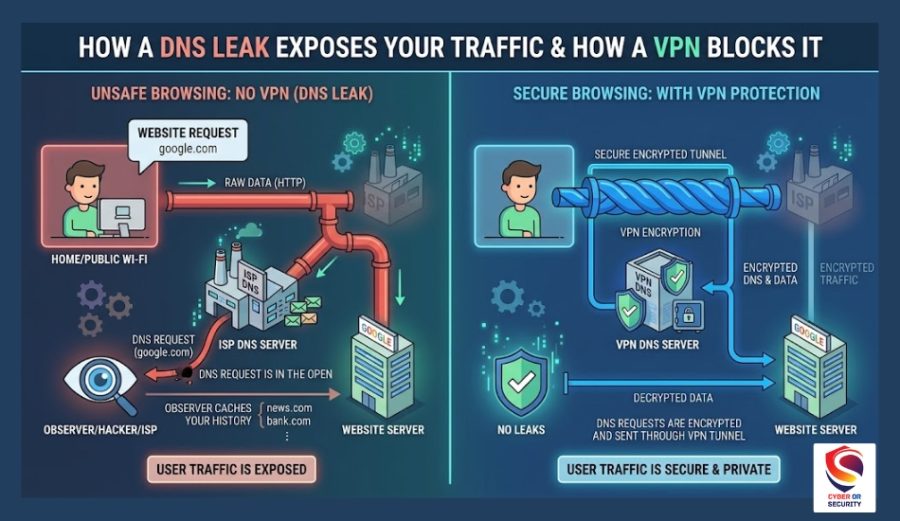
Many professionals now rely on trusted VPN services like NordVPN, Proton VPN, and Mullvad because modern cyber threats have become harder to avoid. Internet providers can track browsing activity. Public networks can expose sensitive data. Weak VPNs may even suffer from DNS leak problems that quietly reveal your traffic.
The best VPN for cybersecurity professionals should do more than hide your IP. It should support advanced protocols like WireGuard and OpenVPN, provide strong AES-256 encryption, follow a strict Zero-log policy, and work smoothly with Linux security tools and remote work environments.
In this guide, you will discover which VPNs cybersecurity experts trust in 2026, how they protect your privacy during ethical hacking work, and which services are truly worth your money based on speed, security, logging policy, and real-world testing.
Quick Answer: NordVPN is the top VPN for cybersecurity professionals in 2026. It operates on RAM-only servers across 115+ countries, has passed five independent no-logs audits, and its Threat Protection Pro feature now leverages CrowdStrike’s threat intelligence. For budget teams and unlimited device coverage, Surfshark is a close second. For maximum privacy with open-source transparency, ProtonVPN is the ideal choice.

Why Cybersecurity Professionals Need a VPN Specifically Built for Their Work?
A VPN means Virtual Private Network, which works perfectly for streaming Netflix, but it is not the same tool you need when you are running a penetration test, conducting OSINT research, or managing a red team operation from a hotel room.
The stakes are different. If a consumer VPN leaks your IP during a binge session, the worst outcome is a geo-block. If it leaks your real IP during an authorized pentest, you have exposed your identity, potentially violated your engagement scope, and handed the defending team a false lead. In a bug bounty context, it can disqualify your submission entirely.
Security professionals use VPNs for several very specific purposes, such as masking their origin IP during reconnaissance, routing traffic through jurisdictions their targets do not flag, isolating specific tools via split tunneling, and maintaining operational security across extended engagements. None of these use cases is addressed by the average consumer-grade product.
This guide focuses on what actually matters for professional security work, not just speed scores or streaming compatibility.

What Makes a VPN Right for Security Work?
Before looking at specific products, it helps to know which features actually matter for cybersecurity use and why.
RAM-only server infrastructure is non-negotiable for serious work. Traditional hard-disk servers can retain data even after they are powered down. RAM-only servers wipe everything on reboot. This means no persistent connection logs, no stored metadata, and no recoverable record of what you did or when. For penetration testers and red teamers, this is a foundational requirement.
An independently audited no-logs policy matters because the words “we do not log” are cheap. A policy that has been verified by a credible third-party firm, such as PwC, Deloitte, Cure53, or equivalent, carries actual weight. You want to see multiple audits over multiple years, not a one-time exercise.
Obfuscated servers allow your VPN traffic to appear as regular HTTPS to deep-packet inspection systems. This is critical when working against targets or in environments that actively filter or flag VPN connections.
Split tunneling lets you route only specific applications through the VPN tunnel while keeping others on your regular connection. For pentesters, this is essential for tool isolation you can route Burp Suite or Nmap through the VPN while keeping your local analysis tools on a direct connection.
A reliable kill switch cuts your entire internet connection the moment the VPN tunnel drops. Without this, a momentary disconnect exposes your real IP. For long engagements, you need this to be bulletproof, not approximate.
Jurisdiction and legal exposure determine what happens if authorities knock. A VPN based in a country outside the Five Eyes, Nine Eyes, and Fourteen Eyes intelligence alliances is harder to compel through legal channels. Panama and Switzerland are the jurisdictions that come up most consistently for this reason.
Linux CLI support is a practical requirement many consumer-focused reviews ignore entirely. Most serious security work happens on Kali Linux, Parrot OS, or similar environments. If the VPN requires a GUI, it is a problem.
Best VPNs for Cybersecurity Professionals in 2026
After reviewing capabilities against the criteria above, five providers consistently stand out for professional security use.
1. NordVPN: Best Overall for Security Professionals
Rating: 9.4/10 | Starting at $3.39/month
NordVPN has been the benchmark for security-focused VPN use for several years. In 2026, that lead has widened meaningfully.
A. Server infrastructure and speed:
NordVPN runs 7,300+ RAM-only servers across 115+ countries. Every server operates on diskless hardware, meaning no data persists after a reboot.
The NordLynx protocol, NordVPN’s WireGuard implementation, consistently delivers speeds above 1,200 Mbps on nearby servers.
For work that involves large data transfers, vulnerability scan outputs, packet captures, and payload staging, this matters.
B. Audit record:
NordVPN has completed five independent no-logs audits. PwC verified the infrastructure twice. Deloitte confirmed zero activity or session log retention in both 2023 and 2024.
Cure53 audited the applications. This is the strongest audit record in the consumer VPN space.
C. Threat Protection Pro and CrowdStrike by NordVPN
In February 2026, NordVPN integrated CrowdStrike’s threat intelligence into its Threat Protection Pro feature. CrowdStrike’s Counter Adversary Operations unit tracks more than 265 nation-state, criminal, and hacktivist groups.
That threat intelligence now feeds directly into NordVPN’s real-time blocking of malicious websites, phishing URLs, and malware domains. For security professionals who spend time on the open web during research phases, this adds a meaningful layer of protection at the network level.
Independent testing found Threat Protection Pro blocked around 91% of phishing sites and 86% of malware domains in controlled conditions, figures that put it well ahead of other VPN-bundled security tools.
D. Features relevant to security work:
NordVPN includes Tor over VPN (routing your traffic through the VPN and then into the Tor network).
Double VPN (two sequential encrypted hops across different servers), obfuscated servers for bypassing deep-packet inspection, and split tunneling.
Meshnet a feature that creates a private network between your own devices, regardless of where they are physically located. Meshnet is particularly useful for red team exercises where participants are operating from different locations.
E. NordVPN Encryption Security Layers:
Encryption with AES-256-GCM with a 4096-bit Diffie-Hellman key for OpenVPN connections, and ChaCha20 for the NordLynx/WireGuard protocol. NordWhisper, NordVPN’s post-quantum protocol, is also now live on NordLynx, meaning your traffic is protected against the “harvest now, decrypt later” attack vector that quantum computing will eventually enable.
- Jurisdiction: Panama. Outside all intelligence sharing alliances.
- Linux support: Full CLI application with split tunneling and kill switch functionality.
F. Limitations worth knowing:
The CLI on Linux does not currently expose Meshnet and Threat Protection Pro controls that require the GUI or manual configuration. NordVPN supports up to 10 simultaneous connections, which may be a constraint for teams. The renewal price jumps noticeably after the introductory period.
G. Verdict for security professionals: NordVPN is the most complete package available in 2026. The combination of RAM-only infrastructure, five audits, CrowdStrike-backed threat intelligence, post-quantum encryption, and practical features like Meshnet and Tor over VPN makes it the logical first choice for most security work.
Get NordVPN: 74% off¹ NordVPN | 30-day money-back guarantee | From $3.39/month
2. ProtonVPN: Best for Maximum Privacy
A. Rating: 8.8/10 | Free tier available | Paid from $4.99/month
ProtonVPN is the product of Proton AG, the Swiss company behind ProtonMail. It is built around a different philosophy to NordVPN, one where open-source code and legal jurisdiction take priority over feature breadth.
B. The case for Swiss jurisdiction:
Switzerland is not a member of any intelligence-sharing alliance. Swiss data protection law is among the most restrictive in the world.
When you combine that with an open-source codebase, meaning the client applications can be and have been publicly audited by anyone, you have a level of verifiable trust that most VPNs cannot match.
C. Secure Core Servers Feature
Secure Core servers are ProtonVPN’s most distinctive architecture feature. Traffic routes through servers in hardened data centres in Iceland, Switzerland, and Sweden before exiting to the open internet.
This means that even if the exit server is compromised or monitored, the traffic cannot be traced back to you because the attacker can only see encrypted traffic coming from a Secure Core server, not your actual IP.
D. Features relevant to security work:
ProtonVPN includes a kill switch, split tunneling, Tor over VPN (Onion routing through the VPN), multi-hop routing, port forwarding, and an ad and malware blocker.
It also integrates with the Proton ecosystem, meaning a single account gives you access to ProtonMail and ProtonDrive, which can be useful for compartmentalising sensitive communications during engagements.
- Free tier: ProtonVPN is one of the very few providers with a genuinely usable free tier that includes no data cap. It restricts access to a smaller server set and lower speeds, but for basic operational security or testing, it works without a subscription.
- Limitation: ProtonVPN is noticeably slower than NordVPN on distant servers. The VPN Accelerator feature helps on long-distance connections, but the gap is real in day-to-day use.
Free Promotion: Try ProtonVPN Free | Free tier available | Paid from $4.99/month

3. Surfshark: Best for Unlimited Devices
- Rating: 8.6/10 | Starting at $2.49/month
Surfshark’s primary advantage is unlimited simultaneous connections at one of the lowest price points in the market. For security teams or individuals who run multiple machines, lab environments, and mobile devices, this matters.
- Camouflage Mode hides the fact that you are using a VPN from your ISP and network monitoring tools, equivalent to obfuscation in practical terms. NoBorders Mode activates automatically in heavily restricted regions to maintain connectivity.
- Nexus is Surfshark’s newer infrastructure feature, which routes traffic through a network of VPN nodes rather than a single server, changing your IP address continuously without dropping the connection. For extended reconnaissance work, this makes traffic patterns significantly harder to correlate.
- MultiHop routes your traffic through two different VPN servers in different countries, providing similar protection to NordVPN’s Double VPN.
Surfshark accepts Bitcoin, which adds a layer of payment privacy for situations where that matters.
- Limitation: Surfshark’s audit history is thinner than NordVPN’s, and its server infrastructure is smaller. For teams prioritising audit credibility over cost, NordVPN or ProtonVPN are the better choices.
Get Surfshark | Unlimited devices | From $2.49/month
4. ExpressVPN: Best Audit Credibility for Enterprise Use
Rating: 8.7/10 | Starting at $6.67/month
ExpressVPN is the most expensive option on this list, and its justification is its audit record and enterprise-facing credibility.
The Lightway protocol, which ExpressVPN developed in-house, is open-source and has been independently audited by Cure53.
The Threat Manager feature blocks connections to third-party trackers and known malicious infrastructure, and the kill switch (called Network Lock) integrates correctly with the split tunneling feature, a detail that sounds minor until you discover how many VPNs handle this incorrectly.
ExpressVPN supports up to eight simultaneous connections and has strong cross-platform support, including routers, which is useful for securing an entire home lab or engagement environment at the network level.
The cost question: At $6.67/month on an annual plan, ExpressVPN is roughly twice the price of NordVPN. For individual use, the price gap is hard to justify given NordVPN’s current feature set. For enterprise procurement where audit documentation and vendor credibility are part of the procurement checklist, ExpressVPN’s track record carries weight.
Get ExpressVPN | 8 devices | From $6.67/month
5. Mullvad: Best for Anonymous Account Setup
Rating: 8.4/10 | €5/month flat
Mullvad takes a different approach to almost every other VPN on the market. There are no email addresses, no usernames, and no account required in the traditional sense.
You get a randomly generated account number when you sign up, and you pay in cash or cryptocurrency if you want zero financial footprints. That is the extent of the personally identifying information Mullvad collects.
For security researchers and professionals who need to operate with genuinely minimal data exposure, Mullvad’s model is the most consistent implementation of that principle available commercially.
WireGuard support was something Mullvad helped pioneer before it became widespread. The network is smaller than NordVPN (roughly 800 servers across 41 countries), but the servers are owned outright by Mullvad in many locations, reducing reliance on third-party data centres.
Limitation: The application is functional but lacks the polish of NordVPN or ExpressVPN. There are no browser extensions, no streaming optimisation, and no 24/7 support team. This is a tool for people who know what they are doing. For beginners or teams that need hand-holding, it is not the right fit.
Try Mullvad | Anonymous signup | €5/month flat.
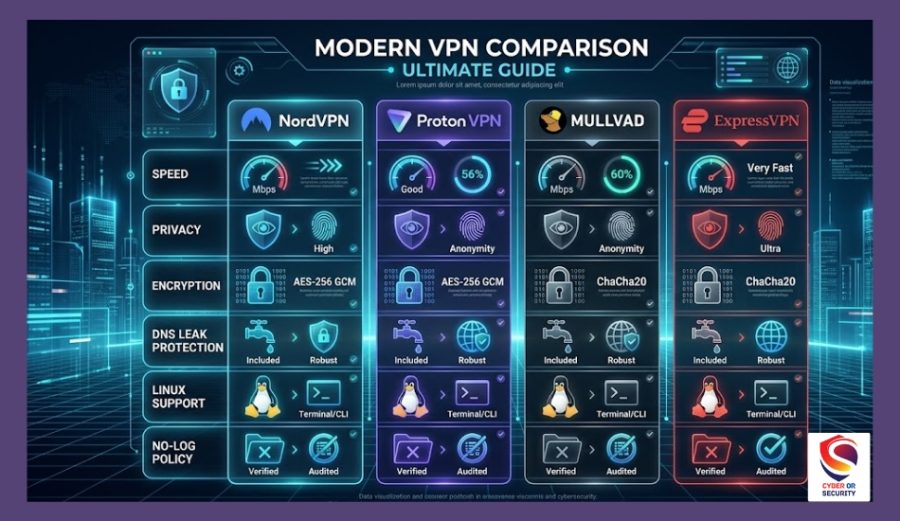
Best VPN Cybersecurity Head-to-Head Comparison
| Feature | NordVPN | ProtonVPN | Surfshark | ExpressVPN | Mullvad |
| RAM-only servers | All | All | All | All | Owned servers |
| No-logs audits | 5 audits | Verified | 2 audits | Multiple | Annual |
| Jurisdiction | Panama | Switzerland | Netherlands | BVI | Sweden |
| Obfuscation | Yes | Yes | Camouflage | Yes | Yes |
| Split tunneling | Yes | Yes | Yes | Yes | Yes |
| Kill switch | Yes | Yes | Yes | Network Lock | Yes |
| Tor over VPN | Yes | Onion | No | No | Yes |
| Double VPN / Multi-hop | Yes | Secure Core | MultiHop | No | Yes |
| Post-quantum encryption | NordWhisper | No | No | No | Yes |
| Linux CLI | Full | Full | Limited | Full | Full |
| Anonymous signup | No | No | No | No | Yes |
| Simultaneous connections | 10 | 10 | Unlimited | 8 | 5 |
| Starting price/month | $3.39 | Free / $4.99 | $2.49 | $6.67 | €5.00 |

VPN for Hackers: Key Use Cases Explained
Understanding which features to lean on for specific work scenarios saves time and protects you during actual engagements.
1. Penetration Testing and Red Team Operations
Split tunneling is the most important feature here. You want to route your exploitation tools, Metasploit, Burp Suite, Nmap, and Cobalt Strike through the VPN while keeping your reporting and communication tools on the local connection. This prevents your C2 traffic from competing for bandwidth with your documentation workflow, and it lets you control attribution at a granular level.
Double VPN or multi-hop routing adds an extra hop between you and the target, making traffic correlation significantly harder. Use this when working against well-resourced defenders who might be monitoring upstream traffic patterns.
RAM-only server infrastructure becomes particularly important on extended engagements. If VPN logs existed and were subpoenaed mid-engagement, RAM-only infrastructure means there is nothing to hand over.
2. OSINT and Reconnaissance
For open-source intelligence work, the ability to rotate exit IP addresses across countries is essential. You want an exit IP that makes sense for the information you are requesting. A server in the same country as a target’s regional office, or an IP that does not immediately flag as a commercial VPN to the platforms you are researching.
NordVPN’s large server count (7,300+) and geographic distribution make IP rotation practical. Surfshark’s Nexus feature takes this further by rotating IPs continuously within a session.

3. Malware Analysis and Threat Research
Custom DNS configuration is a useful capability here. NordVPN allows you to configure DNS queries through third-party resolvers, routing through Quad9 (9.9.9.9) adds automatic malware domain blocking at the DNS layer, or OpenDNS provides additional filtering. When you are downloading samples or visiting known-bad infrastructure in a controlled environment, this provides a secondary layer of containment.
4. Working Across Restricted Networks
Obfuscated servers are the tool for this. Deep-packet inspection systems at corporate firewalls, in certain countries, or on hostile Wi-Fi networks look for VPN signatures in traffic. Obfuscation wraps your VPN traffic in a way that appears as normal HTTPS to those inspection systems.
5. Bug Bounty Hunting
Your real IP is your professional identity in bug bounty contexts. Many programs log incoming IP addresses to verify scope compliance and rule out duplicate submissions. A leak during a submission weakens your claim to the finding. A kill switch that reliably cuts the connection before the IP leaks rather than after a brief exposure window is the single most important feature for this use case.

What to Avoid When Choosing a VPN for Security Work?
Free VPNs without audits. The cost of running a real VPN infrastructure is high. If you are not paying for the product, the business model almost certainly involves monetising your data in some form. For security work, this is an unacceptable trade-off.
VPNs with only one audit. A single audit, done once, tells you about the state of the infrastructure at that specific moment in time. Multiple audits, across multiple years, by different firms, is the standard worth holding providers to. NordVPN’s five audits across four firms are currently the benchmark.
Providers headquartered in Five Eyes jurisdictions. The United States, the UK, Canada, Australia, and New Zealand have mutual intelligence sharing agreements.
A VPN provider based in these countries can be compelled to log and hand over connection data. Even if the provider states they do not log, the legal compulsion to start logging is a real risk.
VPNs that lack a kill switch or implement it poorly. Some providers have a kill switch that works on paper but fails to block traffic during certain types of connection drops, particularly rapid reconnections or protocol switches. Test it before you rely on it.
VPNs that log connection metadata even without activity logs. Some providers log connection timestamps, server used, and bandwidth consumed while claiming a “no-logs” policy. These metadata logs can reveal patterns even without content. Read the privacy policy carefully, and look for what third-party audits specifically verified.

Final Verdict: Best VPN for Hackers and Cybersecurity Experts in 2026
For the majority of cybersecurity professionals, penetration testers, red teamers, bug bounty hunters, and security researchers, NordVPN is the right choice in 2026.
The combination of five independent audits, RAM-only server infrastructure, 7,300+ servers across 115+ countries, post-quantum encryption, CrowdStrike-backed threat intelligence, Tor over VPN, and strong Linux CLI support covers every professional use case.
If maximum privacy is the overriding concern and you are willing to trade some speed and features for open-source transparency and Swiss jurisdiction, ProtonVPN is the correct answer.
For teams managing multiple devices on a tight budget, Surfshark’s unlimited connections at $2.49/month are difficult to argue against.
For professionals who want a genuinely anonymous account setup and a lean, no-frills implementation, Mullvad remains the go-to.
There is no single VPN that is universally right for every use case. Pick based on your actual operational requirements, test the kill switch before you rely on it, and remember that a VPN is one layer of operational security, not the whole stack.
Helpful article: How Can Cybersecurity Affiliate Marketing Elevate Your Brand’s Security Standards?

FAQs: Best VPN for Cybersecurity Professionals in 2026 Tested & Reviewed.
1. Is using a VPN legal for ethical hacking?
Yes. A VPN is a legal privacy tool. Ethical hacking is legal when conducted within the scope of a written authorization from the system owner. The VPN does not change the legal status of your activities; your engagement agreement does. Never use a VPN as cover for unauthorized access; that is illegal regardless of what tools you use.
2. Can a VPN make me completely anonymous?
No. A VPN encrypts your connection and replaces your IP address with the server’s IP. It does not prevent you from being tracked by cookies, browser fingerprinting, account logins, or behavioral patterns. Operational security for serious work requires a layered approach: VPN, clean browser profiles, appropriate hardware separation, and disciplined habits. A VPN is one layer, not a complete solution.
3. What is the difference between split tunneling and full-tunnel routing?
Full-tunnel routing sends all of your traffic through the VPN, every application, every request. Split tunneling lets you specify which applications or destinations go through the encrypted tunnel and which go directly to the internet. For security work, split tunneling gives you precise control over which traffic gets attributed to the VPN exit node.
4. Does NordVPN work on Kali Linux?
Yes. NordVPN provides a full CLI application for Linux, including Kali. You can install it via the package manager, connect to specific servers or countries, enable the kill switch, and configure split tunneling from the command line. Note that Meshnet and Threat Protection Pro controls currently require manual configuration on Linux rather than being exposed through the CLI.
5. Should I use a VPN and Tor together?
Connecting to the VPN first, then entering the Tor network (Tor over VPN) is the safer approach for most use cases. It prevents your ISP from seeing that you are using Tor, and it prevents the Tor entry node from seeing your real IP. NordVPN’s Onion over VPN servers implement this automatically. The trade-off is significant speed reduction. For anonymity-critical research, it is worth it. For everyday operational security during a pentest, it is probably unnecessary overhead.
6. What VPN do real penetration testers use?
Based on practitioner discussions, security community forums, and tool recommendations in courses like OSCP and CEH preparation materials, NordVPN and ProtonVPN appear most frequently. Mullvad has a strong following among practitioners who prioritise anonymous account setup. ExpressVPN is more common in enterprise procurement contexts.