DDoS protection is what you start looking for the moment your website slows down, times out, or suddenly goes offline. You refresh the page. The Distributed Denial of Service (DDoS) attack still prevents the site from loading.
This is often a (DDoS) attack, in which a hidden Botnet sends massive amounts of fake traffic to overwhelm your Network Infrastructure.
Some attacks flood bandwidth, called a Volumetric Attack, while others target your app directly, such as Layer 7 Attacks. Either way, your real users get blocked, and your online site goes down.
You don’t need complex theory right now. You need a way to stop it.
Modern protection works by filtering bad traffic before it reaches your server. A Content Delivery Network spreads requests across a global Edge Network, while a Web Application Firewall blocks harmful requests using Rate Limiting and IP Blacklisting.
Behind the scenes, traffic passes through a Scrubbing Center where Traffic Scrubbing removes attack data and keeps only real users.
This is where trusted platforms step in. Services from Cloudflare, AWS Shield under Amazon Web Services, Akamai with Prolexic, and Fastly use large-scale Cloud Computing to absorb and filter attacks.
Advanced providers like NETSCOUT and its division Arbor Networks, along with DDoS-Guard, Fortinet, GTT Communications, Gcore, OVHcloud, Imperva, and even research insights from Gartner, help shape stronger defenses.
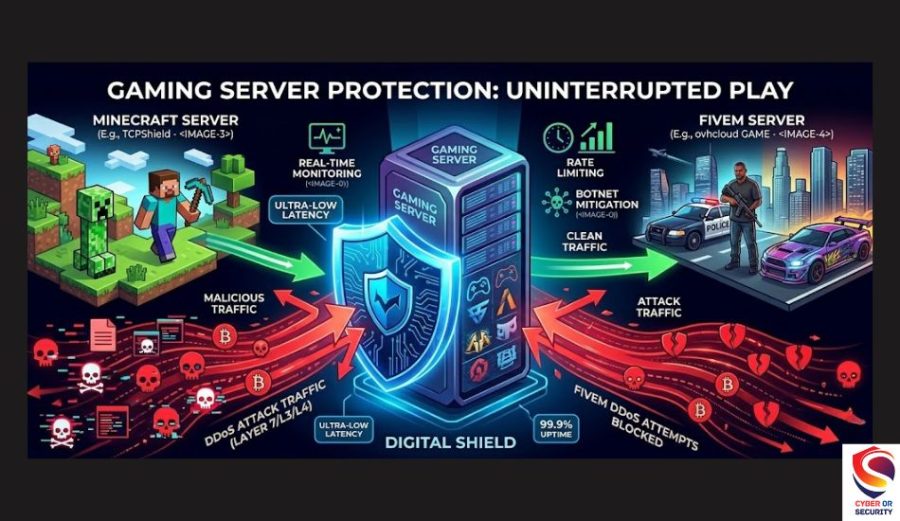
If you run apps on Microsoft Cloud, tools like Azure DDoS Protection and Azure Front Door add another layer of protection. And if your concern is a gaming server like Minecraft or FiveM, or even code platforms like GitHub and domains from Namecheap, the same layered defense applies.
You stay safe when you combine smart filtering, strong infrastructure, and real-time Threat Intelligence. That’s exactly what DDoS protection gives you to keep your website online, fast, and trusted, even when attackers try to take it down.
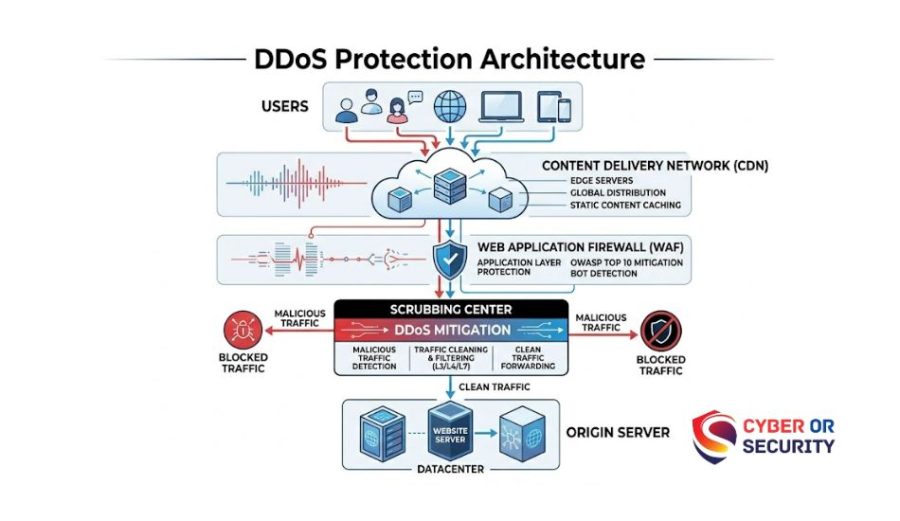
What Is DDoS Protection? How You Keep Your Website Safe from Traffic Attacks
A Distributed Denial of Service (DDoS) attack is simple in idea but dangerous in effect. Your website gets flooded with fake visitors at the same time.
These visitors are not real people. They come from a Botnet of thousands of hacked computers, phones, or servers. Each one sends requests to your site until your Network Infrastructure cannot handle it anymore.
That’s why your site suddenly becomes slow… then stops.
There are two common ways this attack happens:
- A Volumetric Attack sends huge amounts of traffic to fill your bandwidth.
- A Layer 7 Attack targets your website pages, login forms, or APIs to exhaust your server.
Both attacks have one goal: to make your service unavailable to real users. Most people get stuck. You see traffic, but you don’t know if it’s good or bad.
Without online protection, your server tries to handle everything. It cannot tell the difference.
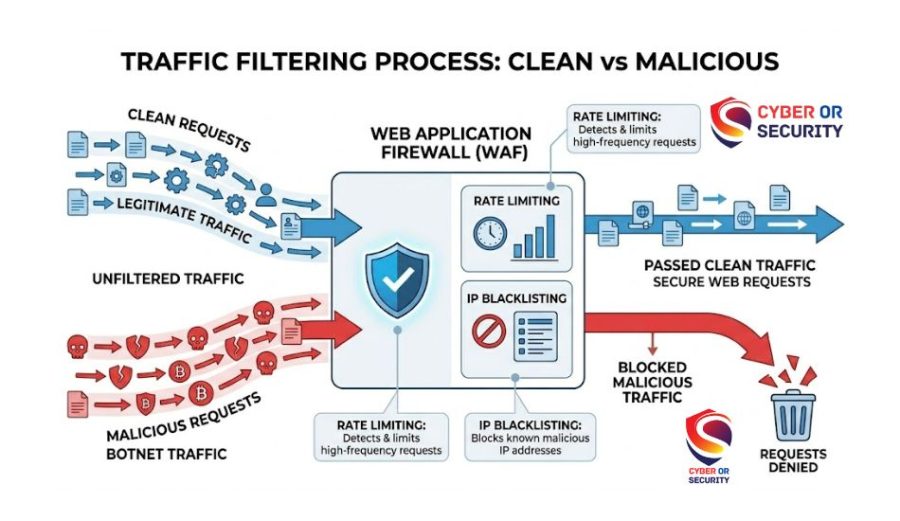
That’s why tools like a Web Application Firewall and a Content Delivery Network are important. They sit in front of your site and act like a smart filter. They use methods such as Rate Limiting and IP Blacklisting to block bad traffic early.
In short, a DDoS attack works by overwhelming you. DDoS protection works by filtering before the damage starts.
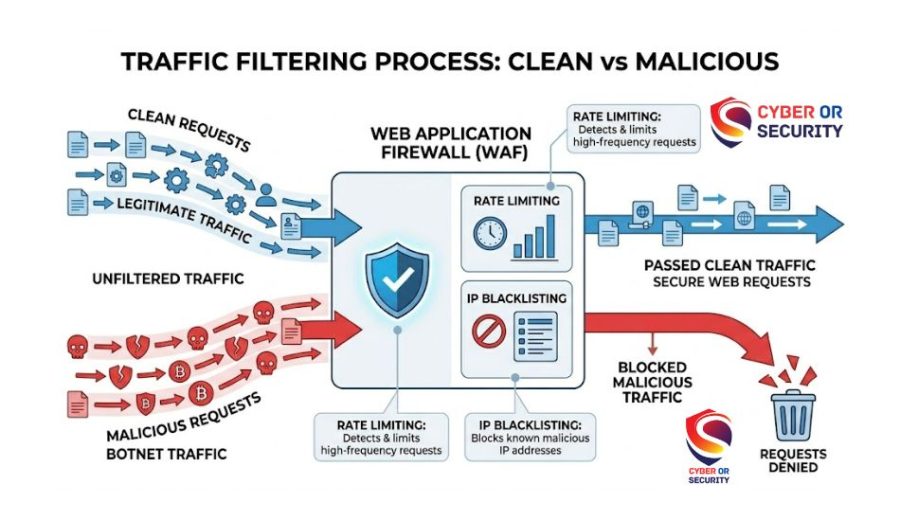
Step-by-Step: How DDoS Protection Works?
Right now, your goal is simple: Stop bad traffic before it reaches your server. That’s exactly what DDoS protection does. It stands in front of your website and filters everything first.
Here’s how it works, step by step:
1. Traffic Is Routed Away From Your Server
Instead of going directly to your site, traffic is sent through a global network. This is done using a Content Delivery Network built on an Edge Network. Providers such as Cloudflare and Fastly distribute requests across many locations.
Result: No single server gets overwhelmed.
2. Suspicious Traffic Gets Identified
Now the system checks each request. It looks for patterns like:
- Too many requests in seconds
- Repeated actions from the same source
- Strange behavior across regions
This uses real-time Threat Intelligence to detect attacks early.
Result: Bad traffic is recognized quickly.
3. Filtering Starts Blocking the Attack
Once traffic looks suspicious, filtering begins. A Web Application Firewall applies rules such as:
- Rate limiting slows down spam requests
- IP Blacklisting blocks known attackers
Result: Attack traffic gets stopped early.
4. Deep Cleaning in Scrubbing Centers
If the attack is large, traffic is sent to a Scrubbing Center. Here, advanced Traffic Scrubbing removes harmful packets and keeps only clean traffic. Companies like Akamai (via Prolexic) and NETSCOUT (with Arbor Networks) specialize in this.
Result: Only real users reach your site.
5. Clean Traffic Reaches Your Server
After filtering, safe traffic is passed back to your system.
Your site stays:
- Online
- Fast
- Accessible
Even during an attack.
6. Cloud Power Handles Massive Attacks
Large-scale protection uses Cloud Computing.
Services like:
- AWS Shield under Amazon Web Services
- Azure DDoS Protection
can absorb huge traffic spikes without downtime.
Result: Your system stays stable even under heavy load.
Simple Way to Understand It
Think of DDoS protection like a smart gate:
- It checks everyone who tries to enter
- It blocks suspicious visitors
- It lets real users pass
Without it, your server tries to handle everything on with it, and only safe traffic gets through.
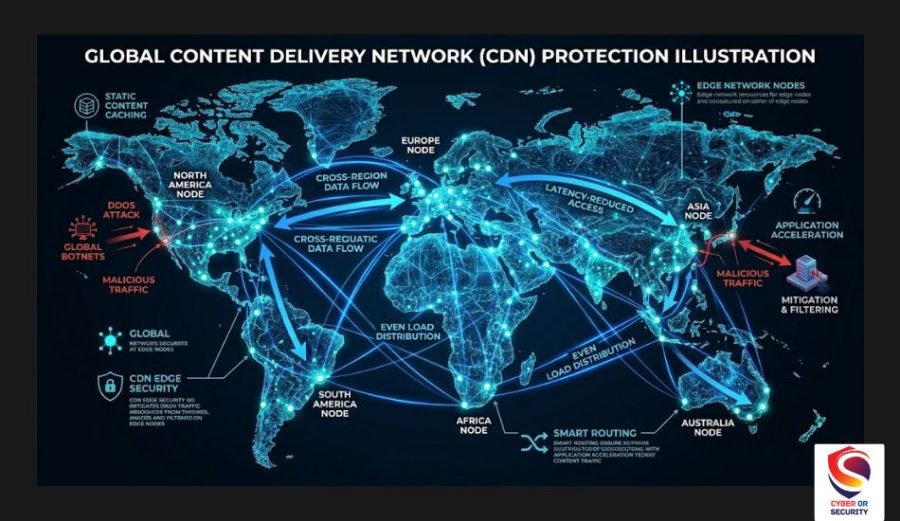
Best DDoS Protection Services You Can Use Right Now
Now you know how protection works. The next step is simple: choose the right tool and turn it on. You don’t need everything; you need the right layer for your setup.
1. Easy Setup Best for Beginners
If you want fast protection without a deep setup:
- Cloudflare
- DDoS-Guard
These tools sit in front of your site, use a Content Delivery Network, and basic Web Application Firewall rules. You turn it on, and traffic starts filtering right away.
Best for:
- Blogs
- Small business sites
- Personal projects
2. Strong Cloud Protection Best for Scaling
If your site runs on cloud infrastructure:
- AWS Shield (inside Amazon Web Services)
- Azure DDoS Protection
These tools use deep Cloud Computing and advanced filtering to handle very large attacks automatically.
Best for:
- SaaS platforms
- APIs
- High-traffic apps
3. Enterprise-Level Protection High Traffic Sites
If downtime costs you money every minute:
- Akamai (with Prolexic)
- Fastly
- Imperva
These providers use global Scrubbing Center networks and real-time Threat Intelligence. They stop complex and targeted attacks. Best for:
- E-commerce
- Financial platforms
- Enterprise systems
4. Deep Network Visibility & Detection
If you want to see and analyze attacks:
- NETSCOUT
- Arbor Networks
- GTT Communications
These focus on monitoring your Network Infrastructure and detecting threats early. You get insight, not just protection.
5. Budget-Friendly & Alternative Options
If you want lower cost or flexible setups:
- OVHcloud
- Gcore
- Fortinet
Good mix of price and performance.
Simple Way to Choose
Ask yourself:
- Small site? Use Cloudflare
- Cloud app? Use AWS Shield or Azure DDoS Protection
- Large business? Use Akamai or Imperva
What Matters Most Don’t Skip This
No tool works alone. You need layers:
- Content Delivery Network
- Web Application Firewall
- Filtering and monitoring
That combination is what actually stops attacks.

What You Should Do Right Now If You Are Under Attack!
If your site is already slow or down, don’t wait. You need quick action, not a perfect setup. Follow this step-by-step:
1. Put a Protection Layer in Front Immediately
Your server cannot fight this alone. Turn on a service like:
- Cloudflare
- DDoS-Guard
They route traffic through a Content Delivery Network and protect it using a Web Application Firewall. This step alone can stop most attacks within minutes.
2. Enable Basic Traffic Filtering
Once protection is active, apply simple rules:
- Turn on Rate Limiting
- Add IP Blacklisting for suspicious sources
This reduces attack pressure fast.
3. Move Traffic Through Safe Networks
If the attack is strong, route traffic through systems that can absorb it:
- AWS Shield (on Amazon Web Services)
- Azure DDoS Protection
These use large-scale Cloud Computing to handle spikes. Your site stays online even under heavy load.
4. Let Scrubbing Systems Clean the Traffic
For bigger attacks, traffic should pass through a Scrubbing Center. Providers like:
- Akamai (with Prolexic)
- NETSCOUT (via Arbor Networks)
Use Traffic Scrubbing to remove attack traffic. Only real users reach your site.
5. Watch Traffic in Real Time
You need to see what’s happening. Use monitoring tools powered by Threat Intelligence. Look for:
- Sudden spikes
- Repeated requests
- Unknown regions
This helps you react faster.
6. Contact Your Hosting Provider
Don’t try to handle everything alone. Providers like:
- OVHcloud
- Gcore
- GTT Communications
can apply network-level protection inside your Network Infrastructure. They can block attacks before they even reach you.
7. If It’s a specific platform, act fast
- Gaming server (Minecraft / FiveM): enable hosting protection
- Code platform (GitHub): use built-in security
- Domain (Namecheap): enable DNS protection
Each platform has built-in defense options.
Simple Truth You Should Remember
A Distributed Denial of Service attack works fast. So your response must be faster. You don’t need a perfect setup right now. You need protection in front of your site immediately.
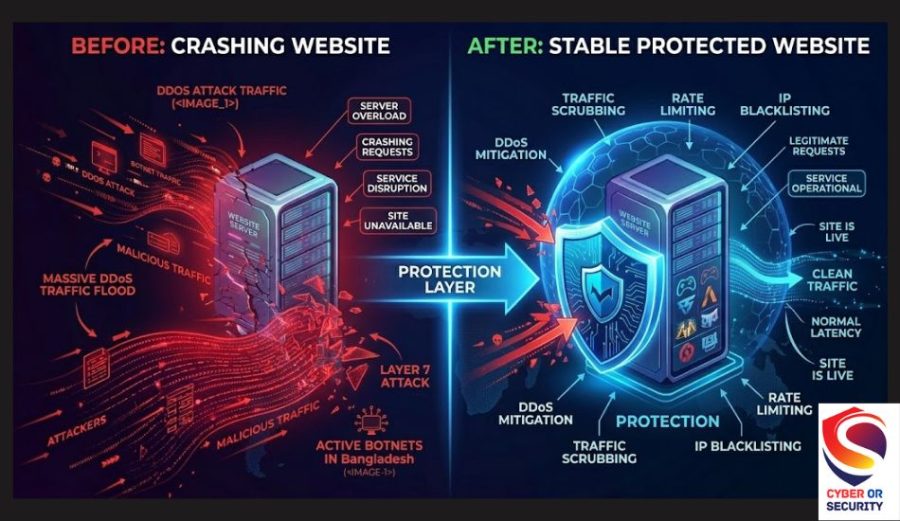
How to Prevent Future DDoS Attacks: Stay Safe Long-Term?
Stopping one attack is not enough. If your site was hit once, it can be targeted again. Now your goal changes: Don’t just react, stay ready.
1. Always Keep Protection Turned On
Do not wait for the next attack. Use a layer like:
- Cloudflare
- Fastly
They run through a Content Delivery Network and protect your site 24/7. This blocks most attacks before they start.
2. Use a Strong Firewall Setup
A Web Application Firewall should always be active. Set simple rules:
- Enable Rate Limiting
- Keep IP Blacklisting updated
This stops repeated attack patterns.
3. Add Multi-Layer Protection Don’t Rely on One Tool
One tool is not enough. Combine:
- CDN
- Firewall
- Cloud protection
Use services like:
- AWS Shield
- Azure DDoS Protection
built on Cloud Computing. Layers make attacks much harder to succeed.
4. Monitor Traffic Every Day
You don’t need deep analysis. Just watch for unusual changes. Use systems powered by Threat Intelligence. Look for:
- Traffic spikes
- Unknown locations
- Repeated requests
Early detection for faster response.
5. Use High-Capacity Network Protection
If your site is growing, upgrade your protection. Providers like:
- Akamai (with Prolexic)
- NETSCOUT / Arbor Networks
- Imperva
Use the global Scrubbing Center systems. These handle large, complex attacks.
6. Protect Your Infrastructure, Not Just Your Website
Your whole Network Infrastructure must be secure. Work with providers like:
- OVHcloud
- Gcore
- GTT Communications
They can block attacks at the network level.
7. Secure Your Specific Platform
Each platform needs its own setup:
- Game servers (Minecraft / FiveM) use protected hosting
- Code platforms (GitHub) enable built-in security
- Domains (Namecheap) secure DNS settings
Small gaps can still cause big problems.
8. Follow Trusted Industry Practices
Security is always evolving. Insights from Gartner and major providers like Fortinet show one thing: Continuous protection is better than reactive fixes.
Simple Rule to DDoS Protection Stay Safe. Attackers look for easy targets. If your protection is always on, they move on.
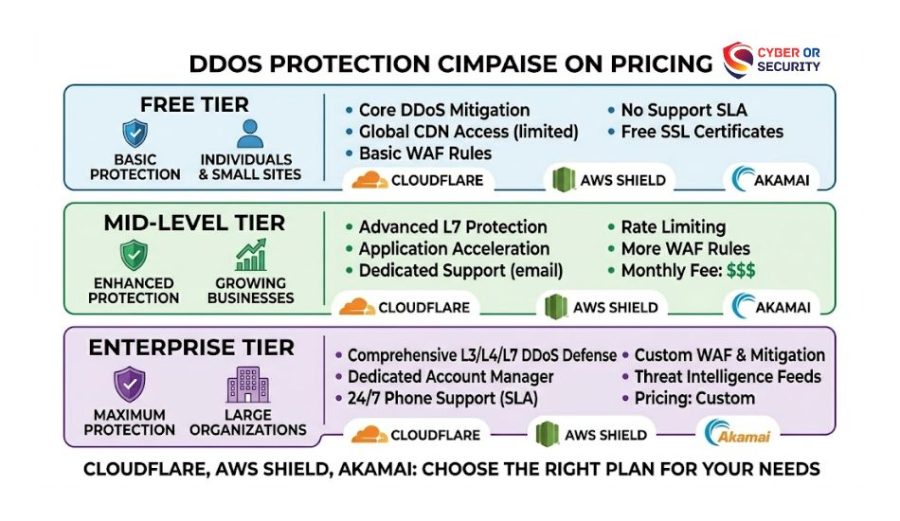
How Much Does DDoS Protection Cost And What You Actually Pay?
You don’t need to guess the price. It depends on how big your site is… and how strong the protection needs to be.
Let’s break it down simply so you can decide fast.
1. Free Protection Good Starting Point
Some providers give basic protection at no cost:
- Cloudflare (free plan)
- OVHcloud (built-in protection)
You still get:
- Content Delivery Network
- Basic Web Application Firewall
- Simple filtering, like Rate Limiting
Best for:
- Small websites
- Personal blogs
- Testing protection
2. Mid-Level Plans Most Websites Use This
If your site is growing and new, you need stricter rules and better control. Common providers:
- Cloudflare (Pro / Business plans)
- Fastly
- Imperva
You get:
- Advanced filtering
- Better performance
- More control over traffic
Cost: Usually a monthly subscription (moderate range)
Best for:
- Business websites
- E-commerce
- Medium traffic apps
3. Enterprise Protection: High Cost and Maximum Safety
If downtime costs you real money, you need full protection.
Top solutions:
- AWS Shield (Advanced tier on Amazon Web Services)
- Azure DDoS Protection
- Akamai (with Prolexic)
- NETSCOUT / Arbor Networks
You get Enterprise Protection:
- Global Scrubbing Center protection
- Real-time Threat Intelligence
- Full-scale Cloud Computing defense
Cost: High, often subscription and usage-based pricing
Best for:
- SaaS platforms
- Financial services
- Large-scale applications
4. What Affects the Price
Your cost depends on:
- Traffic volume
- Attack size (like Volumetric Attack scale)
- Level of filtering needed
- Infrastructure complexity
Because of a bigger system at a higher cost
5. Hidden Cost You Should Think About
The real question is not: “How much does protection cost?”
It is: “How much does downtime cost you?”
If your site goes down due to a Distributed Denial of Service attack:
- You lose users
- You lose trust
- You lose money
Simple Decision Guide
- Just starting? Use a free plan like Cloudflare
- Growing site? Upgrade to mid-level protection
- High-risk business? Use enterprise solutions
Is DDoS Protection Worth It? Real Answer for Your Situation
Short answer: yes if your website matters even a little. But let’s make it real for you.
What Happens Without Protection?
When a Distributed Denial of Service attack hits, your system tries to handle everything. It cannot tell the difference between:
- real users
- fake traffic from a Botnet
So your Network Infrastructure gets overloaded.
Your site becomes:
- slow
- unstable
- completely offline
Even a small Layer 7 Attack can break login pages or APIs.
What You Gain With Protection?
When you use proper DDoS protection, everything changes. Traffic is filtered before it reaches you using:
- Content Delivery Network
- Web Application Firewall
- Advanced filtering, like Rate Limiting
Large attacks are handled by:
- Scrubbing Center
- Systems powered by Cloud Computing
Your site stays online, even under pressure.
Real-World Example: Think Like DDoS Protection
Imagine you run:
- an online store
- a SaaS tool
- or even a game server like Minecraft or FiveM
If your site goes down for just 1 hour:
- users leave
- sales stop
- trust drops
Now compare that to using:
- Cloudflare
- AWS Shield
- Azure DDoS Protection
Protection costs less than the damage.
What Experts Say?
Security research from Gartner shows that downtime and service disruption are among the biggest risks for online businesses. That’s why most serious platforms use layered protection.
When You Might Think It’s Not Worth It
You may feel:
- “My site is small.”
- “No one will target me.”
But attackers often target easy systems. No protection = easy target.
Simple Rule You Should Follow
If your website is:
- public
- growing
- making money
DDoS protection is not optional.
However, A Distributed Denial of Service attack takes minutes to start. Recovery can take hours… or longer. Protection keeps you ahead.

How to Know If You Are Being Attacked: Clear Signs You Should Not Ignore
Sometimes it’s obvious. Sometimes it looks like a normal traffic spike. You need to spot the difference fast.
1. First warning sign: Your Website Suddenly Becomes Slow or Unreachable
You open your site. It takes too long… or does not load at all. This often means your Network Infrastructure is getting overwhelmed by a Distributed Denial of Service.
2. Traffic Spikes Without a Clear Reason
You see a huge jump in visitors.
But:
- No marketing campaign
- No viral content
- No real users
This usually comes from a Botnet sending fake requests. Because traffic looks big, but it’s not real.
3. Too Many Requests in a Short Time
Your server logs show repeated hits:
- Same page
- Same action
- Very fast requests
This is typical of a Layer 7 attack that targets your application directly.
4. Bandwidth Usage Spikes
If your bandwidth suddenly maxes out, you may be facing a volumetric attack, and your network is getting flooded.
5. Unusual IP Activity
You notice:
- Many requests from unknown regions
- Repeated IP addresses
- Suspicious patterns
This is where tools like:
- IP Blacklisting
- Rate Limiting
become critical. You need to block these sources fast.
6. Your Protection Tools Start Triggering Alerts
If you already use:
- Web Application Firewall
- Content Delivery Network
You may see warnings or spikes in blocked traffic. Modern platforms like:
- Cloudflare
- AWS Shield
Use Threat Intelligence to detect attacks early. Don’t ignore these alerts.
7. Specific Platform Issues: Hidden Signs
If you run:
- Game servers like Minecraft or FiveM suddenly disconnect players
- Code services like GitHub API errors increase
- Domains via Namecheap DNS delays
These can be early attack signals.
Simple Check You Can Do Right Now
Ask yourself:
- Is traffic unusually high?
- Is my site slower than normal?
- Are users complaining?
If yes, you may be under a Distributed Denial of Service attack.
However, attacks don’t always look dramatic at first. They often start small… then grow fast. If you catch the signs early, you can stop the damage before it spreads.
Conclusion: Keep Your Website Safe Before the Next Attack Starts
A Distributed Denial of Service attack does not wait. It hits fast, grows quickly, and can take your site down in minutes. But now you know what to do, understand how fake traffic from a Botnet can overwhelm your Network Infrastructure.
You also know how to stop it using smart layers like a Content Delivery Network and a Web Application Firewall, along with filtering methods such as Rate Limiting and IP Blacklisting.
The key is simple control; don’t wait for the next attack. Turn on protection early with trusted platforms like Cloudflare, AWS Shield, or enterprise solutions like Akamai. These systems use global Cloud Computing and powerful filtering to keep your site online, even under pressure.
If your website matters to you, it’s a business, a project, or a growing platform, protection is not optional anymore.
Start small if you need to layer your security over time. Stay aware of traffic changes using Threat Intelligence. DDoS protection is not just about stopping attacks. It’s about making sure your users can always reach you, no matter what.
Relevant article: Stay Safe Online: Simple Ways to Protect Yourself from Hackers
FAQs: What Is DDoS Protection? How It Works and Best Solutions 2026 Guide.
1. What is DDoS protection in simple words?
DDoS protection means stopping fake traffic before it crashes your website. It filters requests coming from a Botnet during a Distributed Denial of Service attack, so only real users can reach your site.
2. How does DDoS protection actually work?
It stands in front of your site and checks every request. Tools like Content Delivery Network and Web Application Firewall. Use rules such as: Rate Limiting, IP Blacklisting. Large attacks are cleaned using Scrubbing Center systems.
3. Is a DDoS attack illegal?
Yes. In many countries, including the United States, launching a Distributed Denial of Service (DDoS) attack is illegal. It is treated as a cybercrime because it disrupts services and causes damage.
4. Can a small website get a DDoS attack?
Yes, and it happens more often than you think. Attackers look for easy targets. If your Network Infrastructure has no protection, it becomes a simple target.
5. Is free DDoS protection enough?
Free tools like Cloudflare can stop basic attacks. But for bigger or repeated attacks, you may need stronger services like AWS Shield and Azure DDoS Protection.
6. How do I stop a DDoS attack fast?
Do this immediately: Enable protection (CDN and firewall), block suspicious traffic, and route traffic through a protection service. Platforms like Cloudflare or Akamai can help you respond quickly.
7. What is the difference between DoS and DDoS?
DoS is one source that attacks your site, and DDoS means many systems attack at once using a Botnet. DDoS is much harder to stop.
8. Can DDoS protection improve performance, too?
Yes. A Content Delivery Network not only protects your site but also speeds it up by using global servers. However, if you had one takeaway, it’s that a Distributed Denial of Service attack tries to overwhelm you. DDoS protection makes sure only real users get through.